C++ 바이너리 직렬화: 엔디안·구조체 패딩 문제와 버전 관리·체크섬
이 글은 C++ 파일 입출력 기초에 이어지는 내용입니다.
들어가며: 게임 세이브 파일이 깨졌다
게임 진행 상황을 저장하는 기능을 만들었는데, 다른 컴퓨터에서 세이브 파일을 열면 데이터가 깨졌다고 해 보겠습니다. 원인은 대개 구조체를 메모리 그대로 파일에 덤프한 데 있습니다.
flowchart LR
  subgraph bad[잘못된 방식]
    B1[구조체 메모리 덤프] --> B2[패딩·엔디안 포함]
    B2 --> B3[다른 플랫폼에서 깨짐]
  end
  subgraph good[올바른 방식]
    G1[필드 단위 직렬화] --> G2[버전·길이·데이터]
    G2 --> G3[이식 가능한 포맷]
  end
문제의 코드는 다음과 같습니다.
struct SaveData {
    int level;
    float health;
    char name[32];
};

void saveGame(const SaveData& data) {
    std::ofstream file("save.dat", std::ios::binary);
    file.write(reinterpret_cast<const char*>(&data), sizeof(data));
}

SaveData loadGame() {
    SaveData data;
    std::ifstream file("save.dat", std::ios::binary);
    file.read(reinterpret_cast<char*>(&data), sizeof(data));
    return data;
}
구조체 전체를 reinterpret_cast로 덤프하면 패딩(정렬을 위해 컴파일러가 넣는 빈 공간)까지 그대로 저장되고, 플랫폼마다 엔디안과 패딩, int의 크기가 다르면 다른 기기에서 읽을 때 값이 어긋납니다. 버전 정보가 없으니 나중에 필드를 추가하면 예전 파일을 읽을 방법도 없습니다. name을 std::string으로 바꾸면 더 나빠집니다. std::string은 내부에 힙 포인터를 갖고 있어서 주소만 저장되고, 불러와도 의미가 없습니다.
직렬화(serialization)는 데이터를 저장하거나 전송할 수 있는 형태로 바꾸는 것입니다. 바이너리 직렬화는 메모리 덤프가 아니라 필드 단위로 쓰고 읽는 규약을 정해 두는 일입니다. 엔디안(endianness)은 다중 바이트 값의 바이트 저장 순서로, 플랫폼마다 다를 수 있습니다. 그래서 버전 번호를 넣고, 정수는 uint32_t 같은 고정 크기 타입으로, 문자열은 길이와 바이트 순으로 저장하는 식으로 포맷을 고정해 두면 이식성이 좋아집니다. 다른 언어나 플랫폼과 파일을 주고받을 계획이라면 JSON이나 Protocol Buffers 같은 기존 포맷을 쓰는 편이 안전하고, C++끼리만 쓴다면 “버전과 필드 단위” 규약을 문서로 남겨 두면 디버깅이 수월합니다.
필드 단위로 바꾼 버전입니다.
struct SaveData {
    int32_t level;
    float health;
    std::string name;

    void serialize(std::ostream& out) const {
        // 버전 정보
        uint32_t version = 1;
        out.write(reinterpret_cast<const char*>(&version), sizeof(version));

        // 고정 크기 필드
        out.write(reinterpret_cast<const char*>(&level), sizeof(level));
        out.write(reinterpret_cast<const char*>(&health), sizeof(health));

        // 문자열: 길이 + 데이터
        uint32_t nameLen = static_cast<uint32_t>(name.size());
        out.write(reinterpret_cast<const char*>(&nameLen), sizeof(nameLen));
        out.write(name.data(), nameLen);
    }

    void deserialize(std::istream& in) {
        uint32_t version;
        in.read(reinterpret_cast<char*>(&version), sizeof(version));

        in.read(reinterpret_cast<char*>(&level), sizeof(level));
        in.read(reinterpret_cast<char*>(&health), sizeof(health));

        uint32_t nameLen;
        in.read(reinterpret_cast<char*>(&nameLen), sizeof(nameLen));
        name.resize(nameLen);
        in.read(name.data(), nameLen);  // C++17부터 data()가 char*를 반환
    }
};
버전 번호를 먼저 쓰고, level과 health를 고정 크기로 쓴 뒤, name은 길이와 바이트를 순서대로 씁니다. deserialize는 같은 순서로 읽고, name은 resize 후 read로 채웁니다. 이 코드는 아직 엔디안을 다루지 않으므로 같은 엔디안 플랫폼 사이에서만 이식됩니다. 엔디안 처리는 뒤에서 다룹니다.
텍스트와 바이너리의 차이, 기본 타입과 배열 쓰기
텍스트 vs 바이너리
텍스트 모드에서 <<로 출력하면 숫자 12345가 문자열 “12345”로 변환되어 5바이트가 됩니다. 바이너리 방식에서는 write로 메모리 내용을 그대로 쓰므로 int는 보통 4바이트만 사용합니다. 바이너리는 크기가 작고 문자열 변환이 없어 빠르지만 사람이 읽을 수 없고, 엔디안과 패딩, 타입 크기가 플랫폼마다 달라질 수 있어서 포맷 규약을 정해 두어야 합니다.
// 텍스트
std::ofstream text("data.txt");
text << 12345;  // "12345" (5바이트)

// 바이너리
std::ofstream bin("data.bin", std::ios::binary);
int value = 12345;
bin.write(reinterpret_cast<const char*>(&value), sizeof(value));  // 보통 4바이트
기본 타입 읽기/쓰기
reinterpret_cast<const char*>(&i)로 변수의 주소를 바이트 시퀀스로 보고 sizeof(i)만큼 씁니다. 읽을 때는 같은 순서, 같은 타입으로 read합니다. 파일을 열 때 std::ios::binary를 지정하지 않으면 Windows에서 개행 문자가 변환되어 바이너리 데이터가 깨질 수 있습니다.
void writeBinary() {
    std::ofstream file("data.bin", std::ios::binary);

    int i = 42;
    double d = 3.14;
    bool b = true;

    file.write(reinterpret_cast<const char*>(&i), sizeof(i));
    file.write(reinterpret_cast<const char*>(&d), sizeof(d));
    file.write(reinterpret_cast<const char*>(&b), sizeof(b));
}

void readBinary() {
    std::ifstream file("data.bin", std::ios::binary);

    int i;
    double d;
    bool b;

    file.read(reinterpret_cast<char*>(&i), sizeof(i));
    file.read(reinterpret_cast<char*>(&d), sizeof(d));
    file.read(reinterpret_cast<char*>(&b), sizeof(b));

    std::cout << "i=" << i << ", d=" << d << ", b=" << b << "\n";
}bool의 크기는 표준이 정하지 않으므로(대부분 1바이트) 이식성이 필요한 포맷에서는 uint8_t로 바꿔 저장하는 편이 안전합니다.
배열 읽기/쓰기
배열은 요소 개수를 먼저 저장해 두어야 읽는 쪽이 크기를 알 수 있습니다. 개수 타입은 플랫폼마다 크기가 다른 size_t 대신 uint32_t나 uint64_t로 고정합니다.
void writeArray() {
    std::ofstream file("array.bin", std::ios::binary);

    int32_t arr[] = {1, 2, 3, 4, 5};
    uint32_t count = sizeof(arr) / sizeof(arr[0]);

    // 개수 먼저 저장
    file.write(reinterpret_cast<const char*>(&count), sizeof(count));
    // 데이터 저장
    file.write(reinterpret_cast<const char*>(arr), sizeof(arr));
}

void readArray() {
    std::ifstream file("array.bin", std::ios::binary);

    uint32_t count;
    file.read(reinterpret_cast<char*>(&count), sizeof(count));

    std::vector<int32_t> arr(count);
    file.read(reinterpret_cast<char*>(arr.data()), count * sizeof(int32_t));

    for (int32_t val : arr) {
        std::cout << val << " ";
    }
}
구조체 저장과 패딩 문제
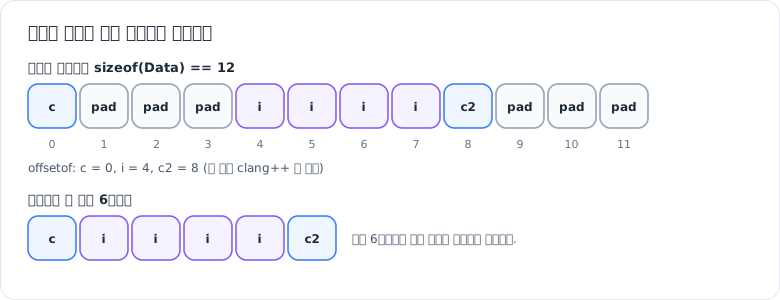
그림: char, int, char 구조체는 c가 0, i가 4, c2가 8 오프셋에 놓여 sizeof가 12다(이 맥의 clang++로 확인). 통째로 쓰면 패딩 6바이트까지 저장되고, 필드별로 쓰면 6바이트만 남는다.
메모리 그대로 저장할 수 있는 타입
memcpy나 write로 바이트를 그대로 복사해도 되는 타입을 trivially copyable 타입이라고 합니다. 사용자 정의 복사·이동 연산과 소멸자, 가상 함수가 없고 멤버도 모두 trivially copyable인 구조체가 여기에 해당하며, std::is_trivially_copyable_v<T>로 확인할 수 있습니다. 예전에는 POD(Plain Old Data)라는 말을 많이 썼지만 C++20에서 std::is_pod는 폐기 예정(deprecated)이 되었습니다.
이런 타입은 주소를 넘겨 sizeof만큼 쓰고 읽을 수 있습니다. 다만 이렇게 만든 파일은 같은 컴파일러, 같은 옵션, 같은 플랫폼에서만 의미가 보장됩니다.
// g++ -std=c++17 -o point_bin point_bin.cpp && ./point_bin
#include <fstream>
#include <iostream>
#include <type_traits>

struct Point {
    int x;
    int y;
};
static_assert(std::is_trivially_copyable_v<Point>);

void savePoint(const Point& p) {
    std::ofstream file("point.bin", std::ios::binary);
    file.write(reinterpret_cast<const char*>(&p), sizeof(p));
}

Point loadPoint() {
    Point p{};
    std::ifstream file("point.bin", std::ios::binary);
    file.read(reinterpret_cast<char*>(&p), sizeof(p));
    return p;
}

int main() {
    savePoint({10, 20});
    Point p = loadPoint();
    std::cout << p.x << " " << p.y << "\n";  // 10 20
    return 0;
}
패딩 문제
struct Data {
    char c;     // 1바이트
    // 3바이트 패딩 (int가 4바이트 정렬일 때)
    int i;      // 4바이트
    char c2;    // 1바이트
    // 3바이트 패딩
};  // 일반적인 x86-64 환경에서 sizeof(Data) == 12

// 나쁜 예: 패딩까지 저장됨
file.write(reinterpret_cast<const char*>(&data), sizeof(data));

// 좋은 예: 필드별로 저장 (6바이트)
file.write(&data.c, sizeof(data.c));
file.write(reinterpret_cast<const char*>(&data.i), sizeof(data.i));
file.write(&data.c2, sizeof(data.c2));
구조체 전체를 쓰면 패딩까지 저장되고, 다른 컴파일러나 #pragma pack 같은 옵션에서는 레이아웃이 달라질 수 있습니다. 패딩 바이트의 값도 정해져 있지 않아서 같은 데이터를 저장해도 파일 내용이 매번 다를 수 있고, 초기화되지 않은 메모리 내용이 파일로 새어 나갈 수도 있습니다. 필드별로 쓰면 실제 데이터만 저장되므로 크기도 줄고 이식성도 좋아집니다.
직렬화 메서드 패턴
#include <fstream>
#include <iostream>

struct Player {
    int32_t id;
    float x, y;
    int32_t health;

    void save(std::ostream& out) const {
        out.write(reinterpret_cast<const char*>(&id), sizeof(id));
        out.write(reinterpret_cast<const char*>(&x), sizeof(x));
        out.write(reinterpret_cast<const char*>(&y), sizeof(y));
        out.write(reinterpret_cast<const char*>(&health), sizeof(health));
    }

    void load(std::istream& in) {
        in.read(reinterpret_cast<char*>(&id), sizeof(id));
        in.read(reinterpret_cast<char*>(&x), sizeof(x));
        in.read(reinterpret_cast<char*>(&y), sizeof(y));
        in.read(reinterpret_cast<char*>(&health), sizeof(health));
    }
};

int main() {
    Player p1{1, 10.5f, 20.3f, 100};

    {
        std::ofstream out("player.bin", std::ios::binary);
        p1.save(out);
    }  // 여기서 파일이 닫히며 버퍼가 비워짐

    Player p2;
    std::ifstream in("player.bin", std::ios::binary);
    p2.load(in);
}save/load를 멤버 함수로 두고 각 필드를 정해진 순서로 쓰고 읽습니다. std::ostream/std::istream을 인자로 받으므로 파일뿐 아니라 std::stringstream 같은 메모리 스트림에도 그대로 쓸 수 있습니다. 같은 함수 안에서 쓰고 바로 읽을 때는 출력 스트림을 먼저 닫아야 합니다. 그러지 않으면 버퍼에 남아 있던 데이터가 아직 파일에 기록되지 않아 읽기가 실패할 수 있습니다.
string, vector처럼 길이가 변하는 데이터 직렬화
std::string 직렬화
void writeString(std::ostream& out, const std::string& str) {
    uint32_t len = static_cast<uint32_t>(str.size());
    out.write(reinterpret_cast<const char*>(&len), sizeof(len));
    out.write(str.data(), len);
}

std::string readString(std::istream& in, uint32_t maxLen = 1u << 20) {
    uint32_t len = 0;
    if (!in.read(reinterpret_cast<char*>(&len), sizeof(len)) || len > maxLen)
        throw std::runtime_error("invalid string length");

    std::string str(len, '\0');
    in.read(str.data(), len);
    return str;
}string은 가변 길이이므로 길이를 먼저 쓰고 그다음 바이트를 씁니다. 읽을 때 길이 상한을 검사하는 이유는, 파일이 손상되었거나 앞 필드에서 오프셋이 어긋나면 길이 자리에 엉뚱한 큰 값이 들어와 std::string(len, '\0')가 수 GB를 할당하려 들기 때문입니다. 외부에서 들어오는 파일을 읽는 코드라면 이 검사는 보안 측면에서도 필요합니다.
std::vector 직렬화
template <typename T>
void writeVector(std::ostream& out, const std::vector<T>& vec) {
    static_assert(std::is_trivially_copyable_v<T>, "bytewise copy only");
    uint32_t count = static_cast<uint32_t>(vec.size());
    out.write(reinterpret_cast<const char*>(&count), sizeof(count));
    out.write(reinterpret_cast<const char*>(vec.data()), count * sizeof(T));
}

template <typename T>
std::vector<T> readVector(std::istream& in, uint32_t maxCount = 1u << 20) {
    static_assert(std::is_trivially_copyable_v<T>, "bytewise copy only");
    uint32_t count = 0;
    if (!in.read(reinterpret_cast<char*>(&count), sizeof(count)) || count > maxCount)
        throw std::runtime_error("invalid vector count");

    std::vector<T> vec(count);
    in.read(reinterpret_cast<char*>(vec.data()), count * sizeof(T));
    return vec;
}
한 번에 바이트로 쓸 수 있는 것은 trivially copyable 타입뿐이라 static_assert로 막아 둡니다. std::vector<std::string>처럼 요소가 동적 데이터를 가지면 요소마다 writeString 같은 함수를 호출해야 합니다.
여러 멤버를 가진 구조체
struct GameState {
    int32_t score;
    std::string playerName;
    std::vector<int32_t> inventory;

    void serialize(std::ostream& out) const {
        out.write(reinterpret_cast<const char*>(&score), sizeof(score));
        writeString(out, playerName);
        writeVector(out, inventory);
    }

    void deserialize(std::istream& in) {
        in.read(reinterpret_cast<char*>(&score), sizeof(score));
        playerName = readString(in);
        inventory = readVector<int32_t>(in);
    }
};
멤버마다 맞는 직렬화 함수를 호출하고, 쓰는 순서와 읽는 순서를 똑같이 유지하면 됩니다.
게임 세이브 예제
매직 넘버, 버전, 읽기 실패 검사까지 포함한 전체 예제입니다.
#include <cstdint>
#include <fstream>
#include <iostream>
#include <string>
#include <vector>

void writeString(std::ostream& out, const std::string& str) {
    uint32_t len = static_cast<uint32_t>(str.size());
    out.write(reinterpret_cast<const char*>(&len), sizeof(len));
    out.write(str.data(), len);
}

bool readString(std::istream& in, std::string& str, uint32_t maxLen = 1024) {
    uint32_t len = 0;
    if (!in.read(reinterpret_cast<char*>(&len), sizeof(len)) || len > maxLen)
        return false;
    str.assign(len, '\0');
    return static_cast<bool>(in.read(str.data(), len));
}

struct GameSave {
    // 'S','A','V','E'를 정수로 표현한 값. 리틀엔디안으로 쓰면 파일에는 "EVAS" 순서로 기록됨
    static constexpr uint32_t MAGIC = 0x53415645;
    static constexpr uint32_t VERSION = 1;

    uint32_t level = 0;
    float health = 0;
    float positionX = 0, positionY = 0;
    std::string playerName;
    std::vector<uint32_t> inventory;

    bool save(const std::string& path) const {
        std::ofstream file(path, std::ios::binary);
        if (!file) return false;

        file.write(reinterpret_cast<const char*>(&MAGIC), sizeof(MAGIC));
        file.write(reinterpret_cast<const char*>(&VERSION), sizeof(VERSION));
        file.write(reinterpret_cast<const char*>(&level), sizeof(level));
        file.write(reinterpret_cast<const char*>(&health), sizeof(health));
        file.write(reinterpret_cast<const char*>(&positionX), sizeof(positionX));
        file.write(reinterpret_cast<const char*>(&positionY), sizeof(positionY));
        writeString(file, playerName);

        uint32_t invCount = static_cast<uint32_t>(inventory.size());
        file.write(reinterpret_cast<const char*>(&invCount), sizeof(invCount));
        file.write(reinterpret_cast<const char*>(inventory.data()),
                   invCount * sizeof(uint32_t));

        file.close();
        return static_cast<bool>(file);
    }

    bool load(const std::string& path) {
        std::ifstream file(path, std::ios::binary);
        if (!file) return false;

        uint32_t magic = 0, version = 0;
        file.read(reinterpret_cast<char*>(&magic), sizeof(magic));
        file.read(reinterpret_cast<char*>(&version), sizeof(version));
        if (!file || magic != MAGIC) {
            std::cerr << "Invalid save file format\n";
            return false;
        }
        if (version != VERSION) {
            std::cerr << "Unsupported version: " << version << "\n";
            return false;
        }

        file.read(reinterpret_cast<char*>(&level), sizeof(level));
        file.read(reinterpret_cast<char*>(&health), sizeof(health));
        file.read(reinterpret_cast<char*>(&positionX), sizeof(positionX));
        file.read(reinterpret_cast<char*>(&positionY), sizeof(positionY));
        if (!readString(file, playerName)) return false;

        uint32_t invCount = 0;
        if (!file.read(reinterpret_cast<char*>(&invCount), sizeof(invCount)) || invCount > 10000)
            return false;
        inventory.resize(invCount);
        file.read(reinterpret_cast<char*>(inventory.data()),
                  invCount * sizeof(uint32_t));

        return static_cast<bool>(file);
    }
};

int main() {
    GameSave save;
    save.level = 5;
    save.health = 85.0f;
    save.positionX = 100.5f;
    save.positionY = 200.3f;
    save.playerName = "Hero";
    save.inventory = {1, 2, 3, 4, 5};

    if (save.save("game_save.dat")) {
        std::cout << "Saved successfully\n";
    }

    GameSave loaded;
    if (loaded.load("game_save.dat")) {
        std::cout << "Loaded: Lv." << loaded.level << " " << loaded.playerName
                  << " HP:" << loaded.health << "\n";
    }
    return 0;
}
실행 결과입니다.
Saved successfully
Loaded: Lv.5 Hero HP:85save에서 file.close() 뒤에 상태를 확인하는 이유는, 디스크가 가득 찬 경우처럼 버퍼를 비우는 단계에서 생기는 쓰기 실패를 놓치지 않기 위해서입니다.
엔디안 변환으로 다른 CPU에서도 읽히게 하기
엔디안이란?
엔디안은 다중 바이트 데이터를 메모리나 파일에 저장할 때 바이트를 어떤 순서로 두는지를 말합니다. 같은 파일을 엔디안이 다른 CPU에서 읽으면 숫자가 뒤바뀌어 보입니다.
flowchart TB
  subgraph le["Little Endian (x86, 대부분의 ARM)"]
    LE1[0x12345678] --> LE2["78 56 34 12"]
    LE2 --> LE3["낮은 바이트 먼저"]
  end
  subgraph be["Big Endian (네트워크 바이트 순서, 일부 CPU)"]
    BE1[0x12345678] --> BE2["12 34 56 78"]
    BE2 --> BE3["높은 바이트 먼저"]
  end
x86과 대부분의 ARM 환경은 리틀엔디안이라 낮은 바이트가 먼저 저장되고, 네트워크 프로토콜(네트워크 바이트 순서)과 일부 CPU는 빅엔디안이라 높은 바이트가 먼저 저장됩니다. 이식성이 필요하면 파일 포맷에 엔디안을 하나로 정하고, 저장과 로드 시 그 순서로 맞춰야 합니다.
엔디안 변환
#include <cstdint>

uint16_t swap16(uint16_t val) {
    return static_cast<uint16_t>((val << 8) | (val >> 8));
}

uint32_t swap32(uint32_t val) {
    return ((val & 0xFF000000u) >> 24) |
           ((val & 0x00FF0000u) >> 8)  |
           ((val & 0x0000FF00u) << 8)  |
           ((val & 0x000000FFu) << 24);
}

// C++23: <bit>의 std::byteswap
// uint32_t swapped = std::byteswap(original);
C++20부터는 <bit>의 std::endian::native로 현재 플랫폼의 엔디안을 표준 방식으로 확인할 수 있고, C++23에서는 std::byteswap이 추가되었습니다. 그 이전에는 GCC/Clang의 __BYTE_ORDER__ 매크로나 컴파일러 내장 함수(__builtin_bswap32, MSVC의 _byteswap_ulong)를 씁니다. __BYTE_ORDER__는 MSVC에서 정의되지 않으므로, MSVC에서는 아래 #if 조건이 항상 거짓이 되어 리틀엔디안으로 취급된다는 점을 알고 써야 합니다(MSVC가 지원하는 Windows 플랫폼은 모두 리틀엔디안이라 실제 문제는 없습니다).
항상 리틀엔디안으로 저장하기
#include <cstdint>
#include <cstring>
#include <ostream>

inline uint32_t toLittleEndian32(uint32_t val) {
#if defined(__BYTE_ORDER__) && __BYTE_ORDER__ == __ORDER_BIG_ENDIAN__
    return swap32(val);
#else
    return val;
#endif
}
// 변환은 대칭이므로 읽을 때도 같은 함수를 쓰면 됨
inline uint32_t fromLittleEndian32(uint32_t val) { return toLittleEndian32(val); }

class BinaryWriter {
    std::ostream& out;

public:
    explicit BinaryWriter(std::ostream& o) : out(o) {}

    void writeU32(uint32_t val) {
        uint32_t le = toLittleEndian32(val);
        out.write(reinterpret_cast<const char*>(&le), sizeof(le));
    }

    void writeI32(int32_t val) {
        writeU32(static_cast<uint32_t>(val));
    }

    void writeFloat(float val) {
        // float는 비트 패턴을 uint32_t로 옮긴 뒤 같은 방식으로 변환
        static_assert(sizeof(float) == sizeof(uint32_t));
        uint32_t bits;
        std::memcpy(&bits, &val, sizeof(bits));
        writeU32(bits);
    }
};BinaryWriter는 플랫폼과 관계없이 파일에 항상 리틀엔디안 순서로 씁니다. float를 정수 포인터로 캐스팅해 읽으면 strict aliasing 규칙 위반이므로 std::memcpy로 비트 패턴을 옮깁니다(C++20에서는 std::bit_cast). 이 방법은 양쪽 플랫폼이 모두 IEEE 754 단정도 형식을 쓴다는 전제가 필요한데, 현재 주요 플랫폼은 모두 이 조건을 만족합니다.
파일 포맷 버전 관리와 체크섬
버전 관리
struct SaveFile {
    static constexpr uint32_t MAGIC = 0x53415645;
    static constexpr uint32_t VERSION = 2;

    int32_t score = 0;
    std::string name;

    void save(const std::string& filename) const {
        std::ofstream file(filename, std::ios::binary);

        // 헤더
        uint32_t magic = MAGIC;
        uint32_t version = VERSION;
        file.write(reinterpret_cast<const char*>(&magic), sizeof(magic));
        file.write(reinterpret_cast<const char*>(&version), sizeof(version));

        // 데이터
        file.write(reinterpret_cast<const char*>(&score), sizeof(score));
        writeString(file, name);
    }

    bool load(const std::string& filename) {
        std::ifstream file(filename, std::ios::binary);
        if (!file) return false;

        uint32_t magic = 0, version = 0;
        file.read(reinterpret_cast<char*>(&magic), sizeof(magic));
        file.read(reinterpret_cast<char*>(&version), sizeof(version));

        if (!file || magic != MAGIC) {
            std::cerr << "Invalid file format\n";
            return false;
        }

        // 버전별 로드, 알 수 없는 버전은 거부
        if (version == 1) {
            loadV1(file);
        } else if (version == 2) {
            loadV2(file);
        } else {
            std::cerr << "Unsupported version " << version << "\n";
            return false;
        }
        return static_cast<bool>(file);
    }

private:
    void loadV1(std::istream& in) {
        in.read(reinterpret_cast<char*>(&score), sizeof(score));
        name = "Unknown";  // V1에는 name이 없음
    }

    void loadV2(std::istream& in) {
        in.read(reinterpret_cast<char*>(&score), sizeof(score));
        name = readString(in);
    }
};
파일 맨 앞에 매직 넘버(파일 형식 식별자)와 버전을 쓰고, 로드할 때 둘 다 검사합니다. 버전마다 로드 함수를 따로 두면 포맷이 바뀌어도 예전 파일을 계속 읽을 수 있습니다. 반대로 구버전 프로그램이 새 버전 파일을 받으면 새 필드를 해석할 수 없으므로 거부해야 합니다. 이 판단을 빼먹으면 체크섬은 맞는데 값이 이상한, 찾기 어려운 버그가 됩니다.
체크섬 추가
#include <numeric>

uint32_t calculateChecksum(const std::vector<char>& data) {
    return std::accumulate(data.begin(), data.end(), uint32_t{0},
                           [](uint32_t sum, char c) {
                               return sum + static_cast<uint8_t>(c);
                           });
}

void saveWithChecksum(const std::string& filename, const std::vector<char>& data) {
    std::ofstream file(filename, std::ios::binary);

    uint32_t checksum = calculateChecksum(data);
    file.write(reinterpret_cast<const char*>(&checksum), sizeof(checksum));

    uint32_t size = static_cast<uint32_t>(data.size());
    file.write(reinterpret_cast<const char*>(&size), sizeof(size));
    file.write(data.data(), size);
}

bool loadWithChecksum(const std::string& filename, std::vector<char>& data) {
    std::ifstream file(filename, std::ios::binary);
    if (!file) return false;

    uint32_t storedChecksum = 0, size = 0;
    file.read(reinterpret_cast<char*>(&storedChecksum), sizeof(storedChecksum));
    file.read(reinterpret_cast<char*>(&size), sizeof(size));
    if (!file) return false;

    data.resize(size);
    if (!file.read(data.data(), size)) return false;

    if (storedChecksum != calculateChecksum(data)) {
        std::cerr << "Checksum mismatch! File corrupted.\n";
        return false;
    }
    return true;
}
여기서는 이해하기 쉽게 바이트 합을 체크섬으로 썼지만, 바이트 합은 두 바이트가 자리를 바꾸는 손상이나 서로 상쇄되는 변경을 잡지 못합니다. 실제 파일 포맷에는 CRC32(zlib의 crc32() 등)를 쓰는 것이 일반적이고, 의도적인 변조까지 막아야 한다면 체크섬이 아니라 HMAC 같은 암호학적 서명이 필요합니다.
데이터가 깨지거나 길이가 0xFFFFFFFF로 읽힐 때
문제 1: 파일을 열었는데 데이터가 이상하다
std::ios::binary를 빼먹은 경우입니다. Windows에서는 텍스트 모드에서 쓸 때 \n이 \r\n으로 바뀌고, 읽을 때는 \r\n이 \n으로 바뀌므로 0x0A 바이트가 들어 있는 바이너리 데이터가 깨집니다. Linux와 macOS에서는 두 모드의 동작이 같아 문제가 드러나지 않다가, Windows에서만 버그가 나는 경우가 많습니다.
// 잘못된 예
std::ofstream file("data.bin");  // 텍스트 모드

// 올바른 예
std::ofstream file("data.bin", std::ios::binary);
문제 2: 다른 PC에서 읽으니 숫자가 완전히 다르다
엔디안 차이입니다. 저장할 때 한 가지 엔디안(보통 리틀엔디안)으로 통일하고, 읽을 때도 같은 규약으로 변환합니다.
uint32_t value = 12345;
uint32_t le = toLittleEndian32(value);  // 항상 리틀엔디안으로
out.write(reinterpret_cast<const char*>(&le), sizeof(le));
문제 3: std::string을 그대로 저장했더니 로드 후 깨진다
std::string 객체는 내부에 포인터를 갖고 있어, 메모리를 덤프하면 문자 데이터가 아니라 주소와 길이 같은 관리 정보만 저장됩니다(짧은 문자열 최적화가 적용되면 일부 문자가 들어가기도 하지만 우연일 뿐입니다). 다른 실행에서는 그 주소가 의미 없고, 로드한 객체가 소멸할 때 엉뚱한 주소를 해제하려다 크래시가 날 수도 있습니다.
// 하면 안 됨: 객체 내부 표현이 저장됨
std::string name = "Player";
file.write(reinterpret_cast<const char*>(&name), sizeof(name));

// 길이 + 데이터
uint32_t len = static_cast<uint32_t>(name.size());
file.write(reinterpret_cast<const char*>(&len), sizeof(len));
file.write(name.data(), len);
직접 실행해 확인했습니다(Ubuntu 24.04 컨테이너, g++ 13.3, 64비트). std::string 객체 자체(sizeof 32바이트)를 파일에 write했다가 같은 프로세스에서 sizeof(std::string) 크기의 날 버퍼에 read한 뒤 그 버퍼를 std::string으로 취급해 보니, "Player" 같은 짧은 문자열은 size()가 6, 내용도 Player로 멀쩡해 보였습니다. 짧은 문자열 최적화로 저장된 포인터가 원래 객체 내부 버퍼를 가리키고 있어서, 원래 객체가 살아 있는 동안은 읽히는 것입니다. 하지만 그 사본의 소멸자를 부르면 munmap_chunk(): invalid pointer로 abort했고, 52자짜리 긴 문자열은 내용이 읽힌 뒤 소멸 시 free(): double free detected in tcache 2로 abort했습니다. 즉 “출력이 맞으니 괜찮다”는 확인으로는 이 버그를 걸러 낼 수 없습니다.
문제 4: 길이를 읽었는데 0xFFFFFFFF 같은 큰 값이 나온다
읽기 순서가 잘못되었거나 이전 필드에서 오프셋이 어긋난 경우입니다. 한 필드라도 순서나 타입이 틀리면 이후 모든 데이터가 밀립니다. 앞선 read가 실패해 변수가 초기화되지 않은 채 남은 경우에도 이런 값이 보입니다. 직렬화 순서를 포맷 문서로 고정하고, 저장한 뒤 다시 로드해 원본과 비교하는 왕복(round-trip) 단위 테스트를 두면 순서 실수를 바로 잡을 수 있습니다. 읽는 쪽에서는 앞에서처럼 길이 상한을 검사해 엉뚱한 값이 대량 할당으로 이어지지 않게 막습니다.
같은 프로그램에서 sizeof는 char, int, char 구조체가 12, #pragma pack(1)을 준 같은 구조체가 6, size_t가 8이었습니다. 패딩을 0xAB로 채운 뒤 필드만 대입한 구조체를 바이트로 찍으면 61 ab ab ab 01 00 00 00 62 ab ab ab로 패딩 자리에 쓰레기 값이 그대로 남았습니다. 12345를 반대 엔디안으로 읽으면 959447040이었고, 내용이 없는 파일에 read한 뒤에는 스트림이 good()이 아니면서 미리 넣어 둔 0xFFFFFFFF가 그대로 남았습니다(실패한 읽기는 변수를 바꾸지 않으므로, 읽기 결과를 검사하지 않으면 초기값이 그대로 길이로 쓰입니다).
문제 5: 32비트와 64비트 빌드 사이에서 개수가 어긋난다
size_t를 그대로 저장한 경우입니다. size_t는 32비트 빌드에서 4바이트, 64비트 빌드에서 8바이트라서, 한쪽에서 쓴 파일을 다른 쪽에서 읽으면 그 뒤의 모든 필드가 밀립니다.
// 플랫폼 의존
size_t count = vec.size();
file.write(reinterpret_cast<const char*>(&count), sizeof(count));  // 4 또는 8바이트

// 고정 크기 타입
uint32_t count = static_cast<uint32_t>(vec.size());
file.write(reinterpret_cast<const char*>(&count), sizeof(count));  // 항상 4바이트
바이너리, 텍스트, JSON의 속도와 크기
같은 정수 배열을 저장할 때 바이너리는 값 하나당 정확히 4바이트(int32_t)를 쓰고, 텍스트는 자릿수와 구분자만큼 쓰므로 값의 범위에 따라 더 작을 수도 클 수도 있습니다. JSON은 여기에 괄호, 쉼표, 키 이름이 더해집니다. 속도 면에서는 바이너리가 숫자와 문자열 사이 변환이 없어 일반적으로 가장 빠르고, 텍스트와 JSON은 변환과 파싱 비용이 추가됩니다. 정확한 차이는 데이터 모양과 라이브러리에 따라 크게 달라지므로, 성능이 중요하다면 실제 데이터로 직접 측정해 보는 것이 좋습니다.
쓰기 호출 줄이기
std::ofstream은 내부 버퍼를 갖고 있어서 작은 write 호출 하나하나가 시스템 콜이 되지는 않습니다. 그래도 호출마다 스트림 상태 확인과 버퍼 관리 비용이 있으므로, 필드가 아주 많다면 메모리 버퍼에 직렬화한 뒤 한 번에 쓰는 방식이 유리할 수 있습니다. 이때도 구조체를 통째로 복사하면 앞에서 본 패딩과 엔디안 문제가 그대로 돌아오므로, 필드 단위로 버퍼에 추가합니다.
// 필드 단위로 버퍼에 쓰는 헬퍼
template <typename T>
void append(std::vector<char>& buf, const T& v) {
    static_assert(std::is_trivially_copyable_v<T>);
    const char* p = reinterpret_cast<const char*>(&v);
    buf.insert(buf.end(), p, p + sizeof(T));
}

std::vector<char> buffer;
buffer.reserve(items.size() * (sizeof(int32_t) + sizeof(float)));
for (const auto& item : items) {
    append(buffer, item.id);     // int32_t
    append(buffer, item.value);  // float
}
out.write(buffer.data(), static_cast<std::streamsize>(buffer.size()));
메모리 맵 파일 (대용량)
큰 파일을 여러 번 임의 접근해야 한다면 mmap으로 파일을 주소 공간에 매핑하는 방법도 있습니다. 커널이 필요한 페이지만 읽어 오고 사용자 버퍼로의 복사가 없어지는 대신, 페이지 폴트 비용이 생기고 순차로 한 번 읽는 경우에는 일반 read와 큰 차이가 없을 수도 있습니다.
// Linux/macOS 예시
#include <sys/mman.h>
#include <sys/stat.h>
#include <fcntl.h>
#include <unistd.h>

bool readLargeFile(const char* path) {
    int fd = open(path, O_RDONLY);
    if (fd < 0) return false;

    struct stat st;
    if (fstat(fd, &st) != 0 || st.st_size == 0) { close(fd); return false; }
    size_t size = static_cast<size_t>(st.st_size);

    void* addr = mmap(nullptr, size, PROT_READ, MAP_PRIVATE, fd, 0);
    close(fd);  // 매핑은 fd를 닫아도 유지됨
    if (addr == MAP_FAILED) return false;

    const char* data = static_cast<const char*>(addr);
    // ... data[0..size) 범위에서 직렬화 데이터 파싱 ...

    munmap(addr, size);
    return true;
}
매핑된 데이터를 uint32_t*로 캐스팅해 바로 읽으면 정렬 요구사항과 strict aliasing 규칙에 걸릴 수 있으므로, 필드는 std::memcpy로 지역 변수에 복사해서 읽는 편이 안전합니다.
원자적 쓰기, 백업, 스키마 문서화
원자적 쓰기
저장 도중 프로그램이 죽으면 반쯤 쓴 파일이 남아 기존 세이브까지 잃을 수 있습니다. 임시 파일에 먼저 쓰고, 성공했을 때 rename으로 원래 파일을 교체하면 다른 프로세스는 항상 이전 파일이나 완성된 새 파일 중 하나만 보게 됩니다.
#include <filesystem>
namespace fs = std::filesystem;

bool saveAtomic(const std::string& path, const std::vector<char>& data) {
    std::string tmpPath = path + ".tmp";
    {
        std::ofstream file(tmpPath, std::ios::binary);
        if (!file.write(data.data(), static_cast<std::streamsize>(data.size()))) return false;
        file.close();
        if (!file) return false;
    }

    std::error_code ec;
    fs::rename(tmpPath, path, ec);  // POSIX에서는 같은 파일 시스템 안에서 원자적
    if (ec) {
        fs::remove(tmpPath, ec);
        return false;
    }
    return true;
}
POSIX의 rename은 같은 파일 시스템 안에서 원자적으로 대상을 교체합니다. 다만 이것은 프로세스 크래시에 대한 보장이고, 전원이 나가는 상황까지 견디려면 rename 전에 임시 파일을 fsync하고 rename 후 디렉터리도 fsync해야 합니다. 표준 C++ 스트림에는 fsync에 해당하는 기능이 없어 플랫폼 API를 써야 합니다. Windows에서도 std::filesystem::rename은 기존 파일을 교체하지만, 모든 조건에서 원자성이 문서로 보장되지는 않습니다.
백업 두기
중요한 세이브 파일은 덮어쓰기 전에 백업을 두고, 저장이 실패하면 백업을 되돌립니다.
bool saveWithBackup(const std::string& path, const GameSave& save) {
    const std::string bak = path + ".bak";
    std::error_code ec;
    if (fs::exists(path)) {
        fs::rename(path, bak, ec);
        if (ec) return false;
    }
    if (!save.save(path)) {
        if (fs::exists(bak)) fs::rename(bak, path, ec);
        return false;
    }
    return true;  // .bak은 남겨 두어, 새 파일이 나중에 손상된 것으로 밝혀지면 복구에 사용
}
백업을 저장 직후 지우지 않고 남겨 두면, 로드 시 매직 넘버나 체크섬 검사에 실패했을 때 .bak에서 직전 상태를 불러올 수 있습니다.
스키마 문서화
직렬화 포맷을 문서로 남겨 두면 다른 팀원이나 나중의 자신이 유지보수하기 쉽습니다.
[게임 세이브 포맷 v1]
- MAGIC: uint32_t = 0x53415645
- VERSION: uint32_t = 1
- level: uint32_t
- health: float (IEEE 754)
- positionX, positionY: float
- playerName: uint32_t len + uint8_t[len] (UTF-8)
- inventory: uint32_t count + uint32_t[count]
- 모든 정수/float: Little Endian
라이브러리 선택
| 상황 | 선택지 |
|---|---|
| C++ 전용, 단순 구조체 | 직접 구현 (이 글의 방식) |
| 여러 언어 간 교환, 스키마 진화 | Protocol Buffers, FlatBuffers |
| 사람이 읽어야 함 | JSON (nlohmann/json), YAML |
| 역직렬화 없이 바로 접근 (제로 카피) | FlatBuffers, Cap’n Proto |
| C++ 객체 그래프 직렬화 | cereal, Boost.Serialization |