C++ nlohmann/json 실전: 파싱·커스텀 타입 직렬화·에러 처리와 자주 틀리는 동작
C++ 표준 라이브러리에는 JSON 파서가 없습니다. REST API 응답이나 config.json 같은 설정 파일을 읽으려면 서드파티 라이브러리가 필요한데, strstr이나 정규식으로 직접 파싱하면 중첩 객체, 배열, 이스케이프 문자 처리에서 금방 버그가 납니다. 구조체마다 j["name"] = obj.name을 반복해 쓰는 것도 번거롭고, "age": "30"처럼 타입이 예상과 다른 값이 들어왔을 때의 동작도 정해 두어야 합니다.
nlohmann/json은 이런 일을 처리하는 헤더 전용 C++ JSON 라이브러리입니다. STL과 비슷한 인터페이스([], contains, find, value), to_json/from_json을 통한 커스텀 타입 변환, 예외 기반 에러 보고를 제공합니다. C++11 이상에서 동작하며, vcpkg(vcpkg install nlohmann-json), Conan, CMake FetchContent로 추가하거나 단일 헤더를 복사해 쓸 수 있습니다. 이 글은 3.12.x 기준입니다.
nlohmann/json에서 실수가 가장 자주 나는 곳은 문법이 아니라 편한 API가 조용히 하는 일입니다. operator[]가 없는 키를 만들어 넣고, value()는 null 앞에서 예외를 던지고, 실수를 정수로 읽으면 소수점이 말없이 잘리고, dump()하면 키 순서가 알파벳순으로 바뀝니다. 기본 사용법과 함께 이런 동작은 아래 “자주 나는 에러” 절에 모아 두었습니다.
설치와 기본 사용
헤더만 포함
#include <nlohmann/json.hpp>
using json = nlohmann::json;
단일 헤더(json.hpp)를 프로젝트에 복사하거나, 패키지 매니저로 설치한 뒤 include 경로만 맞추면 됩니다.
vcpkg로 설치
vcpkg install nlohmann-jsonCMake에서 find_package(nlohmann_json CONFIG REQUIRED) 후 target_link_libraries(your_target PRIVATE nlohmann_json::nlohmann_json)로 연동합니다.
FetchContent (CMake)
include(FetchContent)
FetchContent_Declare(
  json
  URL https://github.com/nlohmann/json/releases/download/v3.12.0/json.tar.xz
)
FetchContent_MakeAvailable(json)
target_link_libraries(your_target PRIVATE nlohmann_json::nlohmann_json)
git 저장소 전체를 클론하는 대신 릴리스의 json.tar.xz(CMake 지원이 포함된 경량 아카이브)를 받는 방식이 공식 README에서 권장하는 방법이고, 전체 저장소보다 훨씬 빨리 받아집니다.
첫 예제
json j = {{"name", "Alice"}, {"age", 30}}는 중괄호 초기화로 JSON 객체를 만듭니다. j["name"], j["age"]로 키에 접근하면 해당 값이 json 타입으로 나오고, std::cout으로 출력하면 JSON 표기 그대로(문자열은 따옴표 포함) 찍힙니다. 키가 없을 때 non-const j["key"]는 null을 넣어 버리므로, 존재 여부를 확인하려면 j.contains("key") 또는 j.find("key") != j.end()를 먼저 쓰는 것이 안전합니다.
// 복사해 붙여넣은 뒤: g++ -std=c++17 -o json_basic json_basic.cpp -I<nlohmann/json 경로> && ./json_basic
// (vcpkg/Conan/FetchContent로 nlohmann-json 설치 후 -I 경로만 맞추면 됨)
#include <nlohmann/json.hpp>
#include <iostream>
using json = nlohmann::json;
int main() {
    json j = {{"name", "Alice"}, {"age", 30}};
    std::cout << j["name"] << "\n";  // "Alice"
    std::cout << j["age"] << "\n";   // 30
    return 0;
}
실행 결과: "Alice" 와 30 이 각각 한 줄씩 출력됩니다.
parse·at·value·dump: 파싱과 접근, 직렬화
문자열 파싱
R"(...)"는 raw string 리터럴이라 이스케이프 없이 따옴표를 그대로 쓸 수 있습니다. json::parse(str)는 문자열을 파싱해 json 객체로 만들고, 파싱 실패 시 json::parse_error 예외를 던집니다. 예외 없이 처리하려면 json::parse(str, nullptr, false)처럼 세 번째 인자(allow_exceptions)를 false로 주고, 결과가 j.is_discarded()인지 확인합니다(nullptr가 반환되는 것이 아닙니다). 설정 파일처럼 주석이 들어간 JSON은 네 번째 인자 ignore_comments를 true로 주면 //, /* */ 주석을 허용합니다.
json j = json::parse(input, nullptr, /*allow_exceptions=*/false, /*ignore_comments=*/true);
if (j.is_discarded()) {
    // 문법 오류
}
#include <nlohmann/json.hpp>
#include <string>
#include <iostream>
using json = nlohmann::json;
int main() {
// 1. 기본 문자열 파싱
std::string str = R"({"key": "value", "num": 42})";
json j = json::parse(str);
// get<T>로 명시적 타입 변환
std::string key = j["key"].get<std::string>();
int num = j["num"].get<int>();
std::cout << key << ", " << num << "\n"; // value, 42
// 2. 중첩 객체 파싱
std::string nested = R"({
"user": {"name": "Alice", "age": 30},
"tags": ["admin", "user"]
})";
json j2 = json::parse(nested);
std::string name = j2["user"]["name"].get<std::string>();
int age = j2["user"]["age"].get<int>();
std::cout << name << ", " << age << "\n"; // Alice, 30
return 0;
}실행 결과: value, 42와 Alice, 30이 각각 출력됩니다.
파일 파싱
json::parse는 std::istream도 받으므로, std::ifstream으로 연 파일을 넘기면 파일 내용 전체를 JSON으로 파싱합니다. 파일을 중간 문자열로 한 번 더 복사하지 않아도 됩니다.
#include <nlohmann/json.hpp>
#include <fstream>
#include <stdexcept>
#include <string>
using json = nlohmann::json;
json load_config(const std::string& path) {
    std::ifstream f(path);
    if (!f) {
        throw std::runtime_error("Cannot open file: " + path);
    }
    try {
        return json::parse(f);
    } catch (const json::parse_error& e) {
        throw std::runtime_error(std::string("JSON parse error: ") + e.what());
    }
}
// 사용 예: config.json
// {
//   "port": 8080,
//   "host": "0.0.0.0"
// }
// json j = load_config("config.json");
// int port = j.value("port", 8080);
config.json 예시:
{
  "port": 8080,
  "host": "0.0.0.0",
  "timeout": 30
}
dump: JSON을 문자열로 직렬화
j.dump()는 한 줄로 압축된 JSON 문자열을 반환하고, j.dump(2)는 들여쓰기 2칸으로 보기 좋게 출력합니다. API 요청 본문이나 로그에 쓸 때는 dump()로 직렬화합니다.
#include <nlohmann/json.hpp>
#include <iostream>
using json = nlohmann::json;
int main() {
    json j = {{"name", "Bob"}, {"scores", {10, 20, 30}}};
    // 한 줄 압축 (API 요청, 로그에 적합)
    std::string compact = j.dump();
    std::cout << compact << "\n";  // {"name":"Bob","scores":[10,20,30]}
    // 들여쓰기 2칸 (디버깅, 설정 파일 저장에 적합)
    std::string pretty = j.dump(2);
    std::cout << pretty << "\n";
    return 0;
}
dump 옵션: dump(indent) — indent=-1이면 압축, 2면 들여쓰기 2칸. dump(indent, indent_char, ensure_ascii)로 한글 등 비ASCII 문자 이스케이프 여부를 제어할 수 있습니다.
안전한 접근 패턴
| 방법 | 키 없을 때 | 키는 있는데 값이 null·다른 타입일 때 |
|---|---|---|
j["key"] (non-const) | null을 삽입한 뒤 반환 | 그대로 반환 |
j["key"] (const json) | 정의되지 않은 동작(디버그 빌드에서는 assert) | 그대로 반환 |
j.at("key") | out_of_range 예외 | 그대로 반환 |
j.contains("key") | false | true |
j.value("key", default) | default 반환 | type_error 예외 (null도 마찬가지) |
j.find("key") | end() | iterator 반환 |
value()를 “없거나 이상하면 기본값”으로 생각하기 쉬운데, 기본값은 키가 없을 때만 쓰입니다. 외부 API가 필드를 빼는 대신 "timeout": null로 보내면 j.value("timeout", 30)은 예외를 던집니다. const 객체에 operator[]로 없는 키를 읽는 것은 더 위험해서 릴리스 빌드에서는 조용히 잘못된 메모리를 읽을 수 있으므로, const 참조로 받은 JSON에서는 at()이나 find()만 쓰는 편이 안전합니다.
// ❌ 위험: 키가 없으면 null이 삽입됨
auto v = j["optional_key"];
// ✅ 안전: contains로 먼저 확인
if (j.contains("optional_key")) {
    auto v = j["optional_key"];
}
// ✅ 안전: value로 기본값 지정
auto v = j.value("optional_key", "default");
int age = j.value("age", 0);
배열 순회
j[“items”]가 배열이면 for (auto& item : j[“items”])로 각 요소를 순회할 수 있습니다.
json j = json::parse(R"({"data": [{"id": 1, "name": "A"}, {"id": 2, "name": "B"}]})");
for (auto& item : j["data"]) {
    int id = item["id"].get<int>();
    std::string name = item["name"].get<std::string>();
    std::cout << id << ": " << name << "\n";
}
객체 생성과 수정
json j;
j["name"] = "Bob";
j["scores"] = {10, 20, 30};
j["nested"] = {{"a", 1}, {"b", 2}};
// 배열에 요소 추가
j["tags"].push_back("c++");
j["tags"].push_back("json");
// 중첩 접근
j["nested"]["c"] = 3;
커스텀 타입 직렬화 (to_json, from_json)
기본 패턴
타입과 같은 네임스페이스에 자유 함수 to_json과 from_json을 정의하면, 라이브러리의 기본 adl_serializer가 이를 찾아 j.get<User>()와 json j = obj; 변환에 사용합니다.
#include <nlohmann/json.hpp>
#include <iostream>
#include <string>
#include <vector>
using json = nlohmann::json;
struct User {
    std::string name;
    int age;
    std::vector<std::string> tags;
};
// JSON → User (역직렬화)
void from_json(const json& j, User& u) {
    j.at("name").get_to(u.name);
    j.at("age").get_to(u.age);
    if (j.contains("tags")) {
        j.at("tags").get_to(u.tags);
    }
}
// User → JSON (직렬화)
void to_json(json& j, const User& u) {
    j = json{
        {"name", u.name},
        {"age", u.age},
        {"tags", u.tags}
    };
}
int main() {
    std::string str = R"({"name": "Alice", "age": 30, "tags": ["admin", "user"]})";
    json j = json::parse(str);
    User u = j.get<User>();
    std::cout << u.name << ", " << u.age << "\n";
    json j2 = u;  // to_json 자동 호출
    std::cout << j2.dump(2) << "\n";
    return 0;
}
필수 필드는 at()으로 읽어 없으면 out_of_range가 나게 하고, 선택 필드는 아래처럼 contains()로 확인한 뒤 읽습니다.
선택적 필드 처리
struct Config {
    int port = 8080;           // 기본값
    std::string host = "localhost";
    std::optional<int> timeout;  // 선택적
};
void from_json(const json& j, Config& c) {
    if (j.contains("port")) c.port = j["port"].get<int>();
    if (j.contains("host")) c.host = j["host"].get<std::string>();
    if (j.contains("timeout")) c.timeout = j["timeout"].get<int>();
}
void to_json(json& j, const Config& c) {
    j = {{"port", c.port}, {"host", c.host}};
    if (c.timeout) j["timeout"] = *c.timeout;
}
NLOHMANN_DEFINE_TYPE_NON_INTRUSIVE
매크로로 반복 코드를 줄일 수 있습니다(C++11부터 사용 가능). 이 매크로가 만드는 from_json은 모든 필드를 at()으로 읽기 때문에 키가 하나라도 없으면 예외가 납니다. 필드가 빠질 수 있다면 3.11부터 있는 NLOHMANN_DEFINE_TYPE_NON_INTRUSIVE_WITH_DEFAULT를 쓰면, 없는 키는 기본 생성된 객체의 값을 유지합니다.
struct Point {
    double x;
    double y;
};
NLOHMANN_DEFINE_TYPE_NON_INTRUSIVE(Point, x, y)
// 사용
Point p{1.0, 2.0};
json j = p;
Point p2 = j.get<Point>();

struct Options {
    int retries = 3;
    std::string mode = "fast";
};
NLOHMANN_DEFINE_TYPE_NON_INTRUSIVE_WITH_DEFAULT(Options, retries, mode)
// json::parse(R"({"mode":"safe"})").get<Options>() → retries = 3 유지
enum은 매크로 NLOHMANN_JSON_SERIALIZE_ENUM으로 문자열 매핑을 선언할 수 있습니다. 아래처럼 직접 to_json/from_json을 쓰는 방법과 결과는 같지만, 매핑에 없는 문자열이 오면 첫 번째 항목으로 조용히 변환된다는 점에 주의하세요. 알 수 없는 값을 에러로 처리해야 한다면 직접 작성하는 편이 낫습니다.
enum과 중첩 구조체 직렬화
enum을 문자열로 직렬화하고, 중첩 구조체를 재귀적으로 처리하는 예제입니다.
#include <nlohmann/json.hpp>
#include <string>
#include <vector>
using json = nlohmann::json;
enum class UserRole { Admin, User, Guest };
// enum → 문자열
void to_json(json& j, UserRole r) {
    switch (r) {
        case UserRole::Admin: j = "admin"; break;
        case UserRole::User:  j = "user";  break;
        case UserRole::Guest: j = "guest";  break;
    }
}
void from_json(const json& j, UserRole& r) {
    std::string s = j.get<std::string>();
    if (s == "admin") r = UserRole::Admin;
    else if (s == "user") r = UserRole::User;
    else r = UserRole::Guest;
}
struct Address {
    std::string city;
    std::string zip;
};
NLOHMANN_DEFINE_TYPE_NON_INTRUSIVE(Address, city, zip)
struct UserWithAddress {
    std::string name;
    UserRole role;
    Address address;
};
void to_json(json& j, const UserWithAddress& u) {
    j = {{"name", u.name}, {"role", u.role}, {"address", u.address}};
}
void from_json(const json& j, UserWithAddress& u) {
    j.at("name").get_to(u.name);
    j.at("role").get_to(u.role);
    j.at("address").get_to(u.address);
}
// 사용 예
// json j = UserWithAddress{"Alice", UserRole::Admin, {"Seoul", "12345"}};
// std::cout << j.dump(2);
std::optional과 선택적 필드
C++17 std::optional로 선택적 필드를 안전하게 처리합니다.
#include <nlohmann/json.hpp>
#include <optional>
#include <string>
using json = nlohmann::json;
struct Product {
    std::string id;
    std::string name;
    std::optional<double> price;  // 없을 수 있음
};
void from_json(const json& j, Product& p) {
    j.at("id").get_to(p.id);
    j.at("name").get_to(p.name);
    if (j.contains("price") && !j["price"].is_null()) {
        p.price = j["price"].get<double>();
    }
}
void to_json(json& j, const Product& p) {
    j = {{"id", p.id}, {"name", p.name}};
    if (p.price) j["price"] = *p.price;
}
parse_error·type_error 처리와 사전 검증
파싱 예외
json::parse는 문법 오류 시 json::parse_error를 던집니다. e.what()과 e.byte로 오류 위치를 확인할 수 있습니다.
#include <nlohmann/json.hpp>
#include <iostream>
// 필요한 모듈 import
using json = nlohmann::json;
json safe_parse(const std::string& str) {
    try {
        return json::parse(str);
    } catch (const json::parse_error& e) {
        std::cerr << "JSON 파싱 오류: " << e.what() << "\n";
        std::cerr << "바이트 위치: " << e.byte << "\n";
        return json::object();  // 빈 객체로 폴백
    }
}
타입 예외
get<T>()에서 타입이 맞지 않으면 json::type_error가 발생합니다.
try {
    int x = j["name"].get<int>();  // "name"이 문자열이면 type_error
} catch (const json::type_error& e) {
    std::cerr << "타입 오류: " << e.what() << "\n";
}
is_* 메서드로 사전 검증
타입을 먼저 확인한 뒤 get<T>()를 호출하면 type_error를 방지할 수 있습니다.
if (j["age"].is_number_integer()) {
    int age = j["age"].get<int>();
} else if (j["age"].is_string()) {
    int age = std::stoi(j["age"].get<std::string>());
}
if (j["data"].is_array()) {
    for (auto& item : j["data"]) {
        if (item.is_object() && item.contains("id")) {
            int id = item["id"].get<int>();
        }
    }
}
// 지원: is_null, is_boolean, is_number, is_number_integer,
//       is_number_float, is_string, is_array, is_object
JSON Schema 검증 (선택)
nlohmann/json 자체에는 스키마 검증이 없습니다. nlohmann/json-schema 또는 valijson 같은 별도 라이브러리로 스키마 검증을 할 수 있습니다.
type_error, 누락 키, operator[]가 넣는 null: 자주 나는 에러
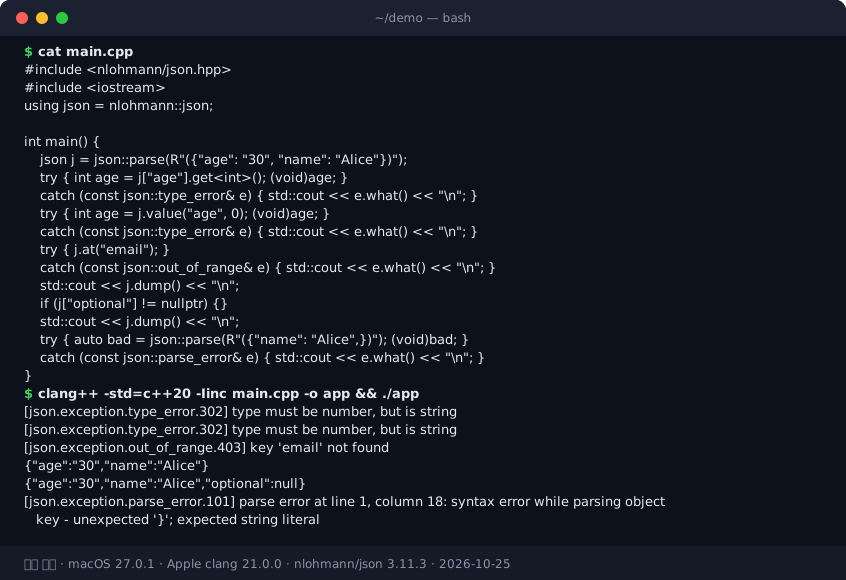
그림: 실제 실행 결과 — “30” 문자열을 int로 읽으면 value()로도 같은 type_error.302가 나고, at()은 없는 키에 out_of_range.403을 던진다. j[“optional”]은 읽기만 했는데 객체에 null을 추가했다. 마지막 줄은 trailing comma의 parse_error.101이다.
에러 1: type_error — 타입 불일치
증상: "type must be number, but is string" 같은 메시지가 나옵니다.
원인: JSON 필드가 문자열인데 get<int>()로 읽거나, 숫자인데 get<std::string>()으로 읽은 경우입니다.
// ❌ 잘못된 예: "age"가 "30" (문자열)인 경우
int age = j["age"].get<int>();  // type_error!
// ✅ 해결 1: is_* 로 검증 후 변환
if (j["age"].is_number_integer()) {
    int age = j["age"].get<int>();
} else if (j["age"].is_string()) {
    int age = std::stoi(j["age"].get<std::string>());
}
// ❌ value()는 해결책이 아님: 키가 있고 값이 "30"이면 value("age", 0)도 type_error
에러 2: out_of_range — 누락된 키
증상: j.at("required_key") 호출 시 키가 없으면 out_of_range 예외가 발생합니다.
원인: API 응답에 필드가 없거나, 설정 파일에 키가 누락됩니다.
// ❌ at()은 키 없으면 예외
auto name = j.at("name").get<std::string>();
// ✅ contains로 먼저 확인
if (j.contains("name")) {
    auto name = j["name"].get<std::string>();
}
// ✅ value로 기본값
auto name = j.value("name", std::string("unknown"));
에러 3: j[“key”]가 null을 삽입합니다
증상: 읽기 전용인데 j["nonexistent"]를 호출하면 객체에 null이 추가됩니다.
원인: operator[]는 키가 없으면 null을 삽입한 뒤 반환합니다.
// ❌ 읽기만 할 때도 객체가 수정됨
if (j["optional"] != nullptr) { ... }  // "optional" 키가 생김!
// ✅ contains 또는 find 사용
if (j.contains("optional")) {
    auto v = j["optional"];
}
// 또는
auto it = j.find("optional");
if (it != j.end()) {
    auto v = *it;
}
에러 4: parse_error — 잘못된 JSON 문법
증상: "parse error at line 1, column 10" 같은 메시지가 나옵니다.
원인: trailing comma, 따옴표 누락, 인코딩 문제 등이 원인입니다.
// ❌ 잘못된 JSON
std::string bad = R"({"name": "Alice",})";  // trailing comma
// ✅ try/catch로 처리
try {
    json j = json::parse(bad);
} catch (const json::parse_error& e) {
    std::cerr << "파싱 실패: " << e.what() << "\n";
}
에러 5: 순환 참조
증상: to_json에서 무한 재귀 또는 스택 오버플로가 발생합니다.
원인: 부모·자식이 서로를 가리키는 구조체에서 to_json이 포인터를 따라가며 양쪽을 모두 직렬화하도록 직접 작성했을 때 생깁니다. nlohmann/json이 포인터를 알아서 따라가지는 않으므로, 문제는 항상 사용자 코드의 재귀입니다.
struct Node {
    std::string value;
    Node* parent;  // 순환 참조 가능
};
// ✅ parent는 직렬화에서 제외하거나, ID로 대체
void to_json(json& j, const Node& n) {
    j = {{"value", n.value}};
    // parent 제외
}
에러 6: 숫자 변환이 조용히 값을 바꿉니다
증상: "price": 19.99를 get<int>()로 읽었더니 예외 없이 19가 나오거나, get<float>() 결과가 원래 값과 미세하게 다릅니다.
원인: nlohmann/json은 숫자 타입끼리의 변환을 static_cast처럼 허용합니다. 실수를 정수로 읽으면 소수점이 잘리고, 음수를 unsigned로 읽으면 큰 양수가 됩니다. 예외가 나지 않으므로 테스트에서 드러나지 않다가 실제 데이터에서 값이 틀어집니다. 저장 자체는 double로 정확히 유지되고 dump()도 왕복 가능한 자릿수로 출력하므로, 손실은 대부분 읽는 쪽 타입 선택에서 생깁니다.
// ❌ 소수점이 조용히 잘림
int price = j["price"].get<int>();          // 19.99 → 19
// ✅ 정수가 와야 하는 필드는 타입을 먼저 확인
if (!j["count"].is_number_integer()) throw std::runtime_error("count must be integer");
// ✅ 금액은 double보다 정수(최소 단위, 예: 원·센트)나 문자열 + decimal 라이브러리로 주고받기
std::int64_t price_cents = j["price_cents"].get<std::int64_t>();
큰 정수도 알아 둘 부분입니다. nlohmann/json은 64비트 정수를 정확히 저장하므로 C++ 쪽에서는 문제가 없지만, 같은 JSON을 JavaScript 클라이언트가 읽으면 2^53을 넘는 ID가 반올림됩니다. 트위터 스타일의 64비트 ID를 브라우저와 주고받는다면 서버에서 문자열로 내보내는 것이 안전합니다.
에러 7: UTF-8 BOM 및 인코딩
증상: 파일 파싱 시 "parse error at line 1, column 1"이 나거나 첫 문자가 깨집니다.
원인: nlohmann/json의 parse는 UTF-8 BOM(EF BB BF)을 자동으로 건너뛰므로 UTF-8 BOM 자체는 대개 문제가 되지 않습니다. 문제가 되는 것은 Windows 메모장의 옛 “유니코드” 저장처럼 UTF-16으로 저장된 파일(FF FE로 시작)입니다. nlohmann/json은 UTF-8만 입력으로 받으므로, 이런 파일은 먼저 UTF-8로 변환해야 합니다. 아래 함수는 파서 앞단에서 직접 바이트를 다룰 때(다른 파서로 넘기거나 로그로 남길 때) 쓸 수 있는 BOM 제거 예시입니다.
// ✅ BOM 제거 후 파싱 (구버전 호환)
std::string read_json_file(const std::string& path) {
    std::ifstream f(path, std::ios::binary);
    std::string content((std::istreambuf_iterator<char>(f)),
                         std::istreambuf_iterator<char>());
    if (content.size() >= 3 &&
        static_cast<unsigned char>(content[0]) == 0xEF &&
        static_cast<unsigned char>(content[1]) == 0xBB &&
        static_cast<unsigned char>(content[2]) == 0xBF) {
        content = content.substr(3);
    }
    return content;
}RapidJSON을 함께 쓰거나 비교 중이라면 동작이 다르다는 점을 알아 두세요. Document::Parse에 BOM이 붙은 문자열을 그대로 넘기면 맨 앞 EF BB BF를 JSON 값으로 읽으려다 kParseErrorValueInvalid 오류가 나는 것이 일반적입니다. 이때는 위처럼 BOM을 직접 잘라 내거나, EncodedInputStream·AutoUTFInputStream으로 입력을 감싸 BOM을 처리하게 합니다. 오류 메시지가 “Invalid value”이고 위치가 offset 0이라면 BOM부터 의심하면 됩니다. 파일 앞 3바이트는 xxd file.json | head -1로 바로 확인할 수 있습니다.
에러 8: 빈 문자열/배열 타입 혼동
증상: 빈 배열에 j["data"][0]로 접근했더니 예외 없이 배열에 null 원소가 생깁니다.
원인: non-const operator[]는 배열에서도 범위를 벗어난 인덱스까지 null로 채워 늘립니다. 객체의 없는 키를 삽입하는 것과 같은 동작이라, 읽기만 하려던 코드가 데이터를 바꿉니다. 범위 검사가 필요하면 at(0)(범위 밖이면 out_of_range)을 쓰거나 empty()를 먼저 확인합니다.
// ❌ 빈 배열일 때 item["id"] 접근 시 문제
for (auto& item : j["data"]) {
    int id = item["id"].get<int>();  // 빈 배열이면 순회 안 함 (OK)
}
// 하지만 j["data"][0] 직접 접근 시
// auto x = j["data"][0]["id"];  // data가 []면 [ {"id": null} ]로 바뀌어 버림
// ✅ size() 확인 후 접근
if (!j["data"].empty()) {
    auto first = j["data"][0];
}
필수·선택 필드 구분, 파싱 래퍼 일원화, ordered_json
필수 필드 vs 선택 필드 구분
필수 필드는 at()으로 검증하고, 선택 필드는 contains() + value()로 처리합니다.
#include <nlohmann/json.hpp>
#include <optional>
using json = nlohmann::json;
struct ApiResponse {
    int code;                    // 필수
    std::string message;         // 필수
    std::optional<json> data;    // 선택 (구조가 가변적일 때)
};
void from_json(const json& j, ApiResponse& r) {
    r.code = j.at("code").get<int>();
    r.message = j.at("message").get<std::string>();
    if (j.contains("data") && !j["data"].is_null()) {
        r.data = j["data"];
    }
}
파싱 래퍼 일원화
프로젝트 전체에서 json::parse를 직접 호출하지 않고, 로깅·폴백을 포함한 래퍼를 사용합니다.
#include <nlohmann/json.hpp>
#include <optional>
#include <functional>
using json = nlohmann::json;
std::optional<json> parse_json_safe(const std::string& input,
    std::function<void(const std::string&)> on_error = nullptr) {
    try {
        return json::parse(input);
    } catch (const json::parse_error& e) {
        if (on_error) on_error(e.what());
        return std::nullopt;
    }
}
// 사용
auto j = parse_json_safe(api_response, [](const std::string& msg) {
    std::cerr << "JSON 파싱 실패: " << msg << "\n";
});
if (j) { /* 정상 처리 */ }
네임스페이스와 ADL
to_json/from_json은 ADL(Argument-Dependent Lookup)로 찾습니다. 그래서 변환할 타입과 같은 네임스페이스에 있어야 하며, 구조체는 myapp에 두고 함수는 전역이나 익명 네임스페이스에 두면 “no matching function” 컴파일 에러가 납니다. 서드파티 타입처럼 그 네임스페이스에 함수를 추가할 수 없다면 nlohmann::adl_serializer<T>를 특수화합니다.
namespace myapp {
struct User { std::string name; int age; };
void to_json(json& j, const User& u) {
    j = {{"name", u.name}, {"age", u.age}};
}
void from_json(const json& j, User& u) {
    j.at("name").get_to(u.name);
    j.at("age").get_to(u.age);
}
}  // namespace myapp
dump와 잘못된 UTF-8
dump()는 문자열에 잘못된 UTF-8 바이트가 섞여 있으면 기본적으로 type_error(316)를 던집니다. 외부 입력이나 레거시 CP949 문자열이 섞일 수 있는 로그 경로라면 j.dump(-1, ' ', false, json::error_handler_t::replace)처럼 네 번째 인자로 잘못된 바이트를 U+FFFD로 바꾸게 해서, 로그 한 줄 때문에 서비스가 예외로 죽는 일을 막습니다.
키 순서가 중요하면 ordered_json
nlohmann::json의 객체는 std::map에 저장되므로 dump() 결과의 키가 알파벳순으로 정렬됩니다. 설정 파일을 읽어 일부만 고친 뒤 다시 저장하면 사람이 정리해 둔 키 순서가 다 바뀌어 diff가 크게 생기는데, 이럴 때는 입력 순서를 보존하는 nlohmann::ordered_json을 씁니다.
nlohmann::ordered_json cfg = nlohmann::ordered_json::parse(file);
cfg["timeout"] = 60;
out << cfg.dump(2); // 원래 키 순서 유지ordered_json은 내부적으로 벡터에 순서대로 저장하므로 키 검색이 선형입니다. 키가 수천 개인 객체를 자주 조회하는 용도에는 맞지 않고, 사람이 편집하는 설정 파일이나 출력 순서가 정해진 API 응답에 적합합니다. json과 ordered_json은 서로 다른 타입이라 to_json/from_json도 따로 맞춰야 한다는 점도 기억해 두세요.
nlohmann/json이 느린 이유와 SAX·json_fwd로 비용 줄이기
nlohmann/json vs 다른 라이브러리
| 라이브러리 | 특징 | 쓰기(생성) | 잘 맞는 곳 |
|---|---|---|---|
| nlohmann/json | STL 같은 API, 커스텀 타입 매핑이 가장 쉬움, 헤더 전용 | O | 설정, REST 응답, 도구, 테스트 |
| RapidJSON | 할당자 제어, in-situ 파싱, 헤더 전용이지만 API가 장황함 | O | 게임, 메모리 제약 환경 |
| simdjson | SIMD 파싱, On-Demand API로 필요한 필드만 읽음 | X (파싱 전용) | 대용량 로그·고처리량 수신 |
| yyjson | C 라이브러리, 파싱·생성 모두 매우 빠름 | O | 성능이 중요한데 쓰기도 필요할 때 |
| Glaze | 컴파일 타임 리플렉션으로 구조체와 직접 매핑, 최신 C++ 표준 필요 | O | 최신 컴파일러에서 속도와 편의 둘 다 |
nlohmann/json이 느린 주된 이유는 모든 값을 동적 할당되는 트리(DOM)로 만들고 객체를 std::map에 넣기 때문입니다. 다른 라이브러리로 바꾸기 전에 먼저 JSON 처리가 실제로 병목인지 프로파일러로 확인해야 합니다. 요청 처리 시간의 대부분이 네트워크나 DB 대기라면 파서를 바꿔도 체감 차이가 거의 없습니다. 파싱이 병목이더라도 필요한 필드가 몇 개뿐이라면, 전체를 갈아타기보다 그 경로만 simdjson의 On-Demand API로 바꾸는 것으로 충분한 경우가 많습니다.
참고로 json::parse(std::ifstream&)처럼 스트림에서 파싱해도 결과 DOM은 전부 메모리에 올라갑니다. 아끼는 것은 파일 내용을 담을 중간 std::string 하나뿐이므로, 메모리가 문제라면 아래의 SAX 파싱이나 NDJSON 같은 다른 접근이 필요합니다.
컴파일 시간
헤더 전용이라 include하는 순간 컴파일 시간이 늘어납니다. nlohmann/json_fwd.hpp를 사용하면 전방 선언만 하고, 실제 사용하는 .cpp에서만 json.hpp를 include해 컴파일 시간을 줄일 수 있습니다.
// header.h
#include <nlohmann/json_fwd.hpp>
void process(const nlohmann::json& j);
// impl.cpp
#include <nlohmann/json.hpp>  // 여기서만 전체 정의
SAX/이벤트 기반 파싱 (대용량)
수십 MB 이상의 JSON에서 특정 키만 추출할 때는 json::sax_parse와 json_sax 핸들러를 사용해 DOM 전체를 만들지 않고 스트리밍으로 처리할 수 있습니다.
#include <nlohmann/json.hpp>
#include <fstream>
#include <iostream>
#include <string>
#include <vector>
using json = nlohmann::json;
// json_sax<json>의 순수 가상 함수를 모두 구현해야 함
struct KeyExtractor : nlohmann::json_sax<json> {
    std::string target_key;
    std::string current_key;
    std::vector<std::string> values;

    explicit KeyExtractor(std::string k) : target_key(std::move(k)) {}

    bool key(string_t& val) override { current_key = val; return true; }
    bool string(string_t& val) override {
        if (current_key == target_key) values.push_back(val);
        return true;
    }
    bool null() override { return true; }
    bool boolean(bool) override { return true; }
    bool number_integer(number_integer_t) override { return true; }
    bool number_unsigned(number_unsigned_t) override { return true; }
    bool number_float(number_float_t, const string_t&) override { return true; }
    bool binary(binary_t&) override { return true; }
    bool start_object(std::size_t) override { return true; }
    bool end_object() override { return true; }
    bool start_array(std::size_t) override { return true; }
    bool end_array() override { return true; }
    bool parse_error(std::size_t pos, const std::string&, const nlohmann::detail::exception& ex) override {
        std::cerr << "parse error at " << pos << ": " << ex.what() << "\n";
        return false;   // 파싱 중단
    }
};

int main() {
    std::ifstream f("users.json");
    KeyExtractor h("name");
    json::sax_parse(f, &h);           // DOM을 만들지 않고 이벤트만 받음
    for (auto& v : h.values) std::cout << v << "\n";
}
이 예제는 단순화를 위해 중첩 깊이를 추적하지 않아서, 다른 위치에 있는 같은 이름의 키도 함께 잡힙니다. 실제로 쓸 때는 start_object/end_object에서 경로 스택을 관리하세요. 파일 전체를 필드 몇 개 때문에 읽는 경우라면 SAX 대신 NDJSON으로 형식을 바꾸거나 simdjson On-Demand를 쓰는 편이 코드가 훨씬 짧습니다.
직접 측정하기
인터넷의 벤치마크 수치는 JSON 모양(숫자 위주인지 문자열 위주인지, 중첩 깊이), 컴파일러, CPU에 따라 몇 배씩 달라집니다. 실제 서비스에서 받는 JSON 샘플로 파싱 시간을 재 보는 것이 가장 정확합니다.
#include <chrono>
auto t0 = std::chrono::steady_clock::now();
for (int i = 0; i < 1000; ++i) {
    auto j = json::parse(sample);   // 실제 응답 샘플
}
auto ms = std::chrono::duration<double, std::milli>(std::chrono::steady_clock::now() - t0).count();
std::cout << "avg " << ms / 1000 << " ms\n";
반드시 최적화 빌드(-O2, Release)로 재세요. 디버그 빌드에서 nlohmann/json은 템플릿 인라이닝이 안 되어 릴리스보다 훨씬 느리게 나오고, 이 숫자를 보고 라이브러리를 바꾸는 결정을 하면 안 됩니다.
API 응답·설정 파일·NDJSON 로그를 다루는 패턴
API 응답 처리 흐름
sequenceDiagram
    participant Client as C++ 클라이언트
    participant API as REST API
    participant JSON as nlohmann/json
    Client->>API: HTTP GET /users
    API->>Client: {"data":[{"id":1,"name":"Alice"}]}
    Client->>JSON: json::parse(response_body)
    JSON->>Client: json 객체
    Client->>JSON: res["data"].get<vector<User>>()
    JSON->>Client: vector<User>
API 응답 처리
#include <nlohmann/json.hpp>
#include <string>
#include <vector>
using json = nlohmann::json;
struct ApiItem {
    int id;
    std::string name;
};
void from_json(const json& j, ApiItem& item) {
    j.at("id").get_to(item.id);
    j.at("name").get_to(item.name);
}
std::vector<ApiItem> parse_api_response(const std::string& response_body) {
    std::vector<ApiItem> result;
    try {
        json res = json::parse(response_body);
        if (!res.contains("data") || !res["data"].is_array()) {
            return result;
        }
        for (auto& item : res["data"]) {
            result.push_back(item.get<ApiItem>());
        }
    } catch (const json::exception& e) {
        // 로깅 후 빈 결과 반환
        return result;
    }
    return result;
}
설정 파일 로드
#include <nlohmann/json.hpp>
#include <fstream>
#include <optional>
using json = nlohmann::json;
struct AppConfig {
    int port = 8080;
    std::string host = "0.0.0.0";
    std::optional<std::string> log_level;
};
void from_json(const json& j, AppConfig& c) {
    if (j.contains("port")) c.port = j["port"].get<int>();
    if (j.contains("host")) c.host = j["host"].get<std::string>();
    if (j.contains("log_level")) c.log_level = j["log_level"].get<std::string>();
}
AppConfig load_config(const std::string& path) {
    std::ifstream f(path);
    if (!f) {
        return AppConfig{};  // 기본 설정 반환
    }
    try {
        return json::parse(f).get<AppConfig>();
    } catch (const json::exception& e) {
        return AppConfig{};
    }
}
요청 본문 생성
json create_request_body(const std::string& action, const std::vector<int>& ids) {
    return {
        {"action", action},
        {"ids", ids},
        {"timestamp", std::time(nullptr)}
    };
}
// HTTP 클라이언트에 전달
std::string body = create_request_body("delete", {1, 2, 3}).dump();
로그 직렬화
struct LogEntry {
    std::string level;
    std::string message;
    std::time_t timestamp;
};
void to_json(json& j, const LogEntry& e) {
    j = {
        {"level", e.level},
        {"message", e.message},
        {"timestamp", e.timestamp}
    };
}
// 로그를 JSON 한 줄로 출력
LogEntry entry{"INFO", "User logged in", std::time(nullptr)};
std::cout << json(entry).dump() << "\n";
에러 복구 가능한 파싱 래퍼
외부 API나 사용자 입력은 항상 잘못된 JSON일 수 있으므로, 파싱 실패 시 로깅하고 기본값을 반환하는 래퍼를 두는 것이 좋습니다.
#include <nlohmann/json.hpp>
#include <optional>
#include <iostream>
using json = nlohmann::json;
struct ParseResult {
    json data;
    bool ok;
    std::string error_message;
};
ParseResult safe_parse_with_logging(const std::string& input) {
    try {
        return {json::parse(input), true, ""};
    } catch (const json::parse_error& e) {
        std::cerr << "[JSON] 파싱 실패: " << e.what()
                  << " (byte " << e.byte << ")\n";
        return {json::object(), false, e.what()};
    }
}
// 사용
auto result = safe_parse_with_logging(api_response);
if (result.ok) {
    // 정상 처리
} else {
    // 폴백 또는 재시도
}
설정 파일 환경별 오버라이드
환경 변수로 JSON 설정을 오버라이드하는 패턴입니다.
#include <nlohmann/json.hpp>
#include <cstdlib>
#include <fstream>
#include <string>
using json = nlohmann::json;
json load_config_with_env_override(const std::string& path) {
    std::ifstream f(path);
    json j = f ? json::parse(f) : json::object();
    // 환경 변수로 오버라이드
    if (const char* port = std::getenv("APP_PORT")) {
        j["port"] = std::stoi(port);
    }
    if (const char* host = std::getenv("APP_HOST")) {
        j["host"] = host;
    }
    return j;
}
NDJSON(Newline-Delimited JSON) 스트리밍
로그·이벤트 스트림을 한 줄씩 파싱하면 메모리에는 한 줄 분량의 DOM만 올라갑니다. 아래 함수의 auto 매개변수는 C++20 축약 함수 템플릿 문법이므로, C++17이라면 template <class F>로 바꿔 쓰면 됩니다.
void process_ndjson(const std::string& path, auto on_line) {
    std::ifstream f(path);
    std::string line;
    while (std::getline(f, line)) {
        if (line.empty()) continue;
        try { on_line(json::parse(line)); }
        catch (const json::parse_error&) { /* 스킵 */ }
    }
}
숫자/문자열 혼용 필드 처리
API가 "count": 100 또는 "count": "100"을 보낼 때 모두 처리하는 헬퍼입니다.
int get_int_flexible(const json& j, const std::string& key, int d = 0) {
    auto it = j.find(key);            // const json에서는 operator[] 대신 find/at
    if (it == j.end() || it->is_null()) return d;
    if (it->is_number_integer()) return it->get<int>();
    if (it->is_string()) {
        const auto& s = it->get_ref<const std::string&>();
        int out = d;
        auto [p, ec] = std::from_chars(s.data(), s.data() + s.size(), out);   // <charconv>, 예외 없음
        return (ec == std::errc{} && p == s.data() + s.size()) ? out : d;
    }
    return d;
}